



In today’s competitive business landscape, small businesses constantly seek ways to improve operational efficiency and reduce maintenance costs. A Computerized Maintenance Management System (CMMS) can be a game-changing solution that transforms how your organization manages maintenance, tracks assets, and optimizes resources.
This comprehensive guide will cover everything you need to know about selecting the right CMMS for your small business. It will ensure you make an informed decision that drives long-term value and operational excellence.
Table of Contents
- Understanding CMMS: What It Is and Why It Matters
- Key Considerations for Small Business CMMS Selection
- Essential Features to Look For
- Budget Considerations
- Top CMMS Solutions for Small Businesses
- Implementation Strategies
- Common Pitfalls to Avoid
- Conclusion
Understanding CMMS: What It Is and Why It Matters
A Computerized Maintenance Management System (CMMS) is a software platform designed to streamline maintenance operations, track assets, manage work orders, and provide critical insights into your maintenance processes. For small businesses, a CMMS is not just a luxury—it’s a strategic tool that can:
- Reduce equipment downtime
- Optimize maintenance scheduling
- Lower overall maintenance costs
- Improve asset lifecycle management
- Enhance operational transparency
Key Considerations for Small Business CMMS Selection
1. Business Size and Complexity
Not all CMMS solutions are created equal. Small businesses need a system that:
- Scales with their growth
- Offers intuitive interfaces
- Provides cost-effective pricing models
- Requires minimal IT infrastructure
2. Industry-Specific Requirements
Different industries have unique maintenance needs. Consider a CMMS that:
- Supports your specific equipment types
- Offers customizable workflows
- Provides industry-specific reporting templates
3. Integration Capabilities
Your CMMS should seamlessly integrate with:
- Existing accounting software
- Inventory management systems
- Enterprise resource planning (ERP) platforms
Essential Features to Look For
Core Functionality
- Work order management
- Preventive maintenance scheduling
- Asset tracking and history
- Inventory management
- Reporting and analytics
Advanced Features
- Mobile Accessibility
- Real-time notifications
- Predictive maintenance capabilities
- Custom dashboard reporting
- Cloud-based storage
Budget Considerations
Budget is crucial for small businesses. When evaluating CMMS solutions, consider:
- Upfront Costs
- Implementation fees
- Software licensing
- Hardware requirements
- Ongoing Expenses
- Monthly/annual subscription
- Training costs
- Technical support
- Potential customization fees
Pricing Models
- Per-user pricing
- Tiered subscription plans
- One-time perpetual license
- Pay-as-you-go options
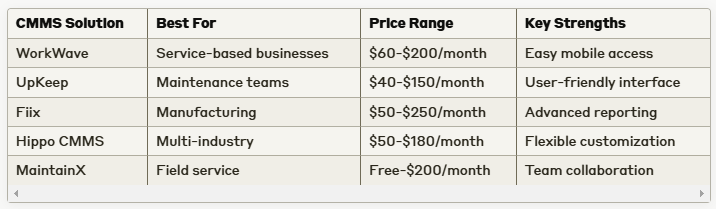
Top CMMS Solutions for Small Businesses
Implementation Strategies
Step-by-Step Implementation
- Conduct a thorough needs assessment
- Choose a solution with the free trial
- Train key team members
- Migrate existing data
- Implement in phases
- Continuously monitor and optimize
Common Pitfalls to Avoid
- Overlooking user experience
- Ignoring integration requirements
- Choosing based solely on price
- Neglecting staff training
- Failing to define clear implementation goals
Conclusion
Selecting the right CMMS is a critical decision that can significantly impact your small business’s operational efficiency. By carefully evaluating your needs, understanding key features, and choosing a solution that grows with your business, you can transform your maintenance management approach.
Remember, the best CMMS is not just about technology—it’s about finding a solution that empowers your team, reduces costs, and drives continuous improvement.
Final Recommendations
- Start with a clear implementation strategy
- Prioritize user-friendly interfaces
- Choose scalable solutions
- Invest in proper training
- Regularly review and optimize your CMMS usage


